| Ctrl +A | Select all layers |
| Ctrl +D | Deselect all layers |
| Ctrl +E | Clear all layers |
| Ctrl +Z | Undo changes |
| Ctrl +Y | Redo changes |
| Ctrl +L | Show/hide Bleed line |
| Ctrl +R | 定規の表示/非表示 |
| Ctrl +H | レイヤーの水平方向の中央揃え |
| Ctrl ++ | ズームインステージ |
| Ctrl +- | ズームアウトステージ |
| Ctrl +0 | Fit stage with viewport |
| Ctrl +1 | Resize stage to real size |
| Ctrl +] | Bring layer forward |
| Ctrl +[ | Bring layer backward |
| Ctrl +O | Load your designs |
| Ctrl +B | Make your text bold |
| Ctrl +I | Italicize your text |
| Ctrl +G | Group layers |
| Ctrl +P | Duplicate layers |
| Alt +U | Make your text UPPERCASE |
| Alt +L | Make your text lowercase |
| Alt +← | Move the selected layers to left 1px |
| Alt +→ | Move the selected layers to right 1px |
| Alt +↑ | Move the selected layers to top 1px |
| Alt +↓ | Move the selected layers to bottom 1px |
| Alt + | Free transform |
| Shift ++ | Zoom out selected layers |
| Shift +- | 選択したレイヤーを拡大 |
| Shift +G | グリッドの表示/非表示 |
| Shift +D | Show/hide stage dimensions |
| Shift +L | Clear all guidelines |
| Shift + | Centered scaling |
| ← | Move the selected layers to left 10px |
| → | Move the selected layers to right 10px |
| ↑ | Move the selected layers to top 10px |
| ↓ | Move the selected layers to bottom 10px |
| Delete | Delete selected layers |
| V | 描画モードを無効にする |
| B | Enable drawing mode |
| Esc | Quit text editing |
| Ctrl +Shift +] | Bring layer to front |
| Ctrl +Shift +[ | Send layer to back |
| Ctrl +Shift +V | レイヤーの垂直方向の中央揃え |
| Ctrl +Shift +I | Import Design |
| Ctrl +Shift +E | Export Design |
| Ctrl +Shift +S | Save Design for later |
| Ctrl +Shift +O | Load Your Design in Cart |
| Ctrl +Shift +G | Ungroup |
| Ctrl +Shift +L | Clear all stages |
| Ctrl +Shift +< | Decreate font size |
| Ctrl +Shift +> | Increate font size |
Copyright © 2022. My Blog
全著作権所有
Powered by Printcart version 1.0.6
Cut Line
これは、製品のトリミングを目指しているところです。 実際のラインは、トリミング プロセスにより異なる場合があります。
Safe zone
Keep text and important imagery within this line to ensure it does not get cut off during trimming.
New design
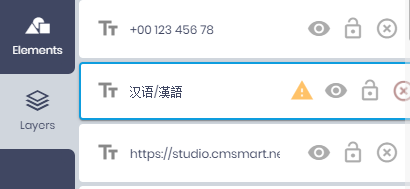
Some fonts you have chosen can not show some of the text you have added. Please choose fonts that is compatible with your language.
Go to <b>Layers tab</b>, check all layers have the exclamation mark:
- ダブルクリックしてテキストを編集
- Right click on selected layers to show context menu
Drag & drop image from sidebar into shape layer to replace the current image.
- マスクされた写真をダブルクリックして、マスク編集モードをオンにします。
- Click Apply mask icon or click outside selected mask to turn off mask editing mode.